The right power for sulcus fixation — and how to avoid the myopic surprise

When an intraocular lens cannot go in the capsular bag, it is placed in the ciliary sulcus, where it sits more anteriorly than planned. Implant the power you calculated for the bag and the patient ends up myopic. This free calculator gives you the corrected sulcus IOL power in seconds — at the slit lamp, in theatre, or planning a secondary lens — and works fully offline once installed on your phone or tablet.

When you need a sulcus IOL power calculation

Sulcus fixation is rarely the plan and almost always a decision made under pressure. You will reach for it when:

  • Posterior capsule rupture during phacoemulsification leaves no safe bag for the lens.
  • Zonular dehiscence or weakness makes in-the-bag fixation unreliable
  • Secondary IOL implantation is planned in an aphakic eye with enough anterior capsular support.
  • IOL exchange requires repositioning the lens outside the bag.

In every one of these scenarios the lens ends up closer to the cornea than the bag position your biometry assumed — and that single shift is enough to change the refractive result

Why bag power leaves the patient myopic in the sulcus

The ciliary sulcus sits roughly half a millimetre to one millimetre anterior to the capsular bag. A more anterior effective lens position increases the lens’s effective plus power, so an IOL calculated for the bag becomes too strong in the sulcus. The result is a myopic surprise. The correction is to reduce the implanted power — but by how much depends on the lens and the power involved, which is exactly where simple rules fall short

The rule of 9s, and where it breaks down

The most widely taught shortcut is the rule of 9s: reduce the bag power by 0.5 D for every 9 D away from zero.

Planned in-the-bag powerSulcus adjustment
< 9 DNone
9 to 18 D-0.5 D
18 to 27 D-1.0 D
> 27 D-1.5 D
Optic captured in bag, haptics in sulcusNone

It is a real improvement over the old “just subtract 1 D”, but it remains a stepwise approximation. It ignores the optimised constant of the specific IOL you are implanting and treats every lens at a given power identically. Two different lenses are not interchangeable, and the steps create artificial jumps at 9, 18 and 27 dioptres.

How this calculator improves on it

Instead of a stepwise rule, the tool works from the emmetropia value and applies the correction that corresponds to the lens you actually use, accounting for its optimised constant and the optic-capture scenario. The result is shown as a large, copyable figure with the constants used displayed underneath, so the calculation is fully transparent.

  • Lens-aware: uses the optimised constant of the selected IOL, preferring the SRK/T constant when available.
  • Optic capture handled: distinguishes full sulcus placement from optic-in-bag capture, which behaves much closer to an in-the-bag lens.
  • Transparent: shows the delta and the constants, never a black-box number.
  • Offline and instant: installable on phone or theatre tablet, no connection required.

Optic capture and reverse optic capture

Placement geometry changes the maths. When the haptics sit in the sulcus but the optic is captured behind the capsulorhexis (reverse optic capture) or in the bag, the lens centres close to the planned bag position and little to no power reduction is needed. Full sulcus placement of both optic and haptics needs the largest correction. The calculator lets you set this explicitly rather than guessing.

A safety note: use a three-piece lens

Power is only half the decision. A single-piece acrylic IOL is not designed for the sulcus — its bulky, sharp-edged haptics can chafe the iris and lead to pigment dispersion, iritis or UGH syndrome. Sulcus placement calls for a three-piece lens with appropriate overall diameter. Get the lens type right first, then correct the power.

How to get started

Tap the button above. On a phone or tablet, add it to your home screen and it opens full-screen, like a native app, online or offline.
Select the planned lens and its in-the-bag power, then set the optic-capture status for this eye.
Copy the corrected sulcus power. The delta and the constants used are shown so you can audit the number before you implant.

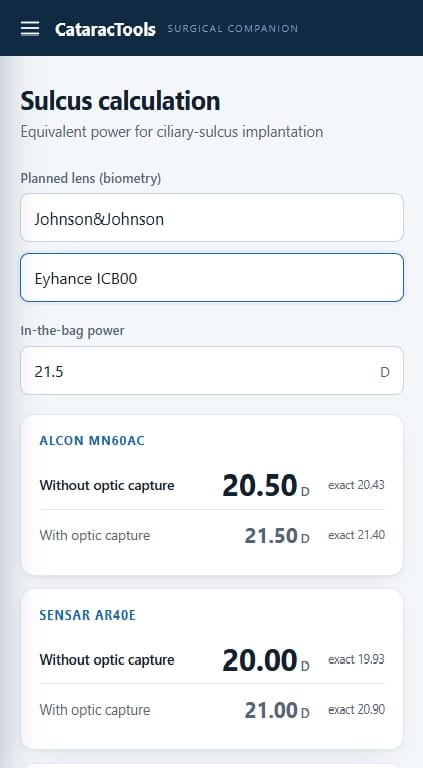
sulcus power

Frequently asked questions

How much should I reduce IOL power for sulcus placement?

It depends on the planned power and the specific lens. The rule of 9s gives 0.5 to 1.5 D in steps, but a constant-aware calculation is more accurate, especially at the extremes of the power range.

Can I put a single-piece IOL in the sulcus?

It is strongly discouraged. Single-piece acrylic haptics can irritate the iris and cause UGH syndrome. A three-piece lens is the appropriate choice for sulcus fixation.

Does optic capture change the power I should implant?

Yes. If the optic is captured in the bag or behind the rhexis, the lens sits near the planned position and needs little or no reduction. Full sulcus placement needs the full correction.

What causes a myopic surprise after a sulcus IOL?

Implanting the power calculated for the capsular bag into the more anterior sulcus position, without reducing it, is the classic cause.

I am text block. Click edit button to change this text. Lorem ipsum dolor sit amet, consectetur adipiscing elit. Ut elit tellus, luctus nec ullamcorper mattis, pulvinar dapibus leo.

Bibliography

  • Suto C, Hori S, Fukuyama E, Akura J. Adjusting intraocular lens power for sulcus fixation. J Cataract Refract Surg. 2003 Oct;29(10):1913-7. PMID: 14604710.
  • Devgan U. How to determine sulcus IOL power and AC IOL power. CataractCoach, 2018.
  • Hill, Dr. Calculating Bag vs Sulcus IOL Power.