When you need to convert IOL power
A last-minute change of lens is more common than the planning suggests. You will need a conversion when:
- The planned lens is not in stock and you implant the available model instead.
- You abandon a toric intraoperatively — poor capsular support, an unstable axis — and switch to a monofocal aiming at the same target.
- You change platform or manufacturer mid-case and the new model carries a different constant.
- A lens is damaged or dropped and the replacement on the trolley is a different model.
- Surgeon or patient preference shifts to another lens while the refractive plan stays the same.
Why a different lens shifts the target
Every IOL model carries its own optimised constant, which encodes its effective lens position and optical design. The power your biometry recommended is tied to the constant of the lens it was calculated for. Put a different model in at the same labelled power and it lands at a different refraction, because its constant is different. To hold the target, the power has to move by the difference between the two constants.
How it works
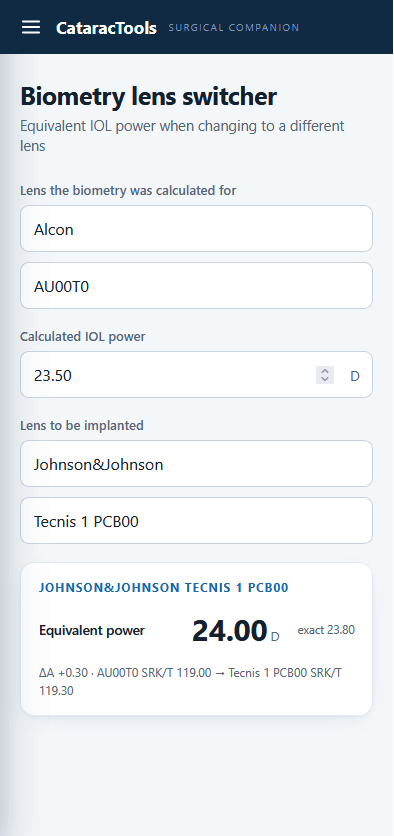
You select the lens the biometry was calculated for together with its power, then the lens you are going to implant. The tool returns the equivalent power for the same refractive target using the standard constant-exchange method:
Ptarget = Psource + (Atarget − Asource)
It prefers the optimised SRK/T constant of each lens, shows the result as a large copyable figure, displays the ΔA line with the exact constants used, and warns you when a lens falls back to its nominal A-constant because no optimised value is available.
- Constant-aware: uses the optimised SRK/T constant of each model when available.
- Transparent: shows the ΔA and the constants behind the result, never a black-box number.
- Honest about its limits: flags when it is working from a nominal rather than optimised constant.
- Offline and instant: installable on phone or theatre tablet, no connection required.
How this calculator improves on it
The rule of 9s falls short because it is stepwise, but the underlying optics are not. As the lens moves forward into the sulcus, the myopic shift grows smoothly and in proportion to the implanted power — there is nothing special about 9, 18 or 27 D. Forcing that smooth relationship into three steps means every lens within a band receives the same correction, and the error is largest at the edges of each band.
This calculator replaces the steps with the curve. It starts from the exact in-the-bag power you planned and applies the power-specific reduction read from an optimised bag-to-sulcus table — values computed across the entire power range from the real change in effective lens position (roughly 5.2 mm in the capsular bag to 4.7 mm in the sulcus). Every power gets its own correction, with no artificial jumps.
On top of that, it is lens-specific. Instead of treating all IOLs at a given power as interchangeable, it uses the optimised constant of the lens you actually select (preferring the SRK/T constant when available), so two different lenses at the same nominal power are corrected differently — as they should be. And because placement geometry changes the maths, you set the optic-capture scenario explicitly rather than assuming full sulcus position.
The result is never a black box: the corrected power is shown as a large, copyable figure, with the delta and the constants used displayed underneath so you can audit the number before you implant.